Understanding Components and Data Types
Reading time: ~7 minutes | Level: Beginner Prerequisites: Tutorial 2: SDCStudio Overview
What You'll Learn
- What a component is and what properties it carries
- The SDC4 type hierarchy and how types relate to each other
- When to use each data type
- How to read a component detail page in SDCStudio
- The difference between quantified and non-quantified types
What is a Component?
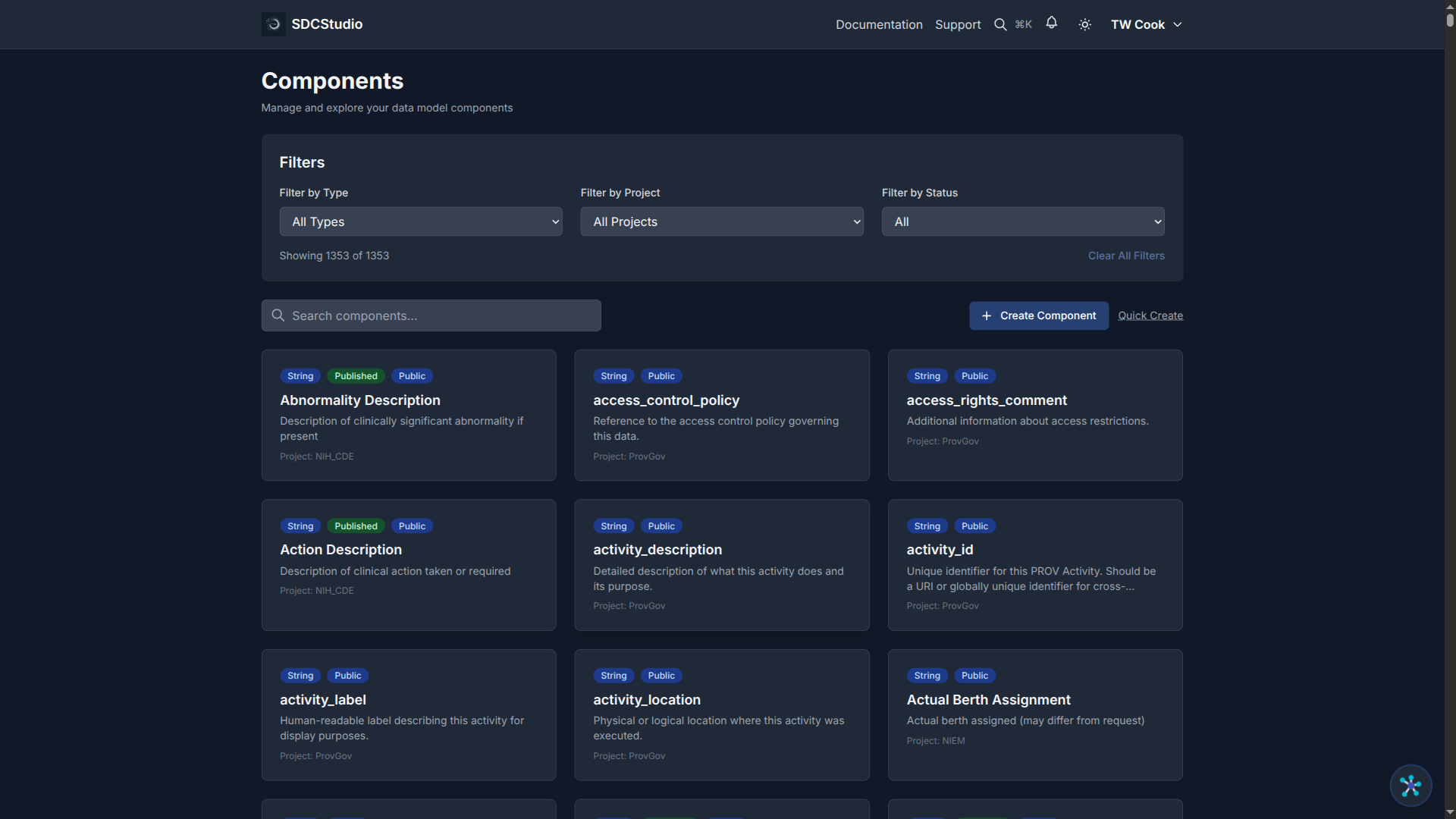
A component is a single data element in your model — one field, one column, one piece of information. Every component has:
- Type: The SDC4 data type (XdString, XdCount, XdTemporal, etc.)
- Label: A human-readable name (e.g., "Customer Email Address")
- Description: What the component represents and how it should be used
- Validation rules: Constraints on acceptable values (patterns, ranges, enumerations)
- Semantic links: RDF predicate-object pairs connecting the component to ontology concepts
When the AI processes your uploaded file, it creates one component per column (for CSV) or per data element (for Markdown templates).
The Type Hierarchy
All SDC4 types inherit from a common base, XdAnyType, which provides shared metadata: label, definition, temporal validity fields, and access control tags. The full hierarchy:
XdAnyType (base — label, definition, temporal metadata, access control)
├── XdStringType          — general text
├── XdTokenType           — normalized whitespace text
├── XdBooleanType         — true/false
├── XdOrderedType (abstract — ordering semantics)
│   ├── XdOrdinalType     — ordered categories
│   └── XdQuantifiedType (abstract — units, magnitude status)
│       ├── XdCountType   — non-negative integers + units
│       ├── XdQuantityType— decimals + required units
│       ├── XdFloatType   — single-precision float
│       └── XdDoubleType  — double-precision float
├── XdTemporalType        — dates, times, partial dates
├── XdLinkType            — references to other models/resources
└── XdFileType            — binary data / file references
The key distinction is between quantified types (XdCount, XdQuantity, XdFloat, XdDouble) which require units, and non-quantified types (XdString, XdBoolean, XdTemporal) which do not.
When to Use Each Type
XdString — Text Data
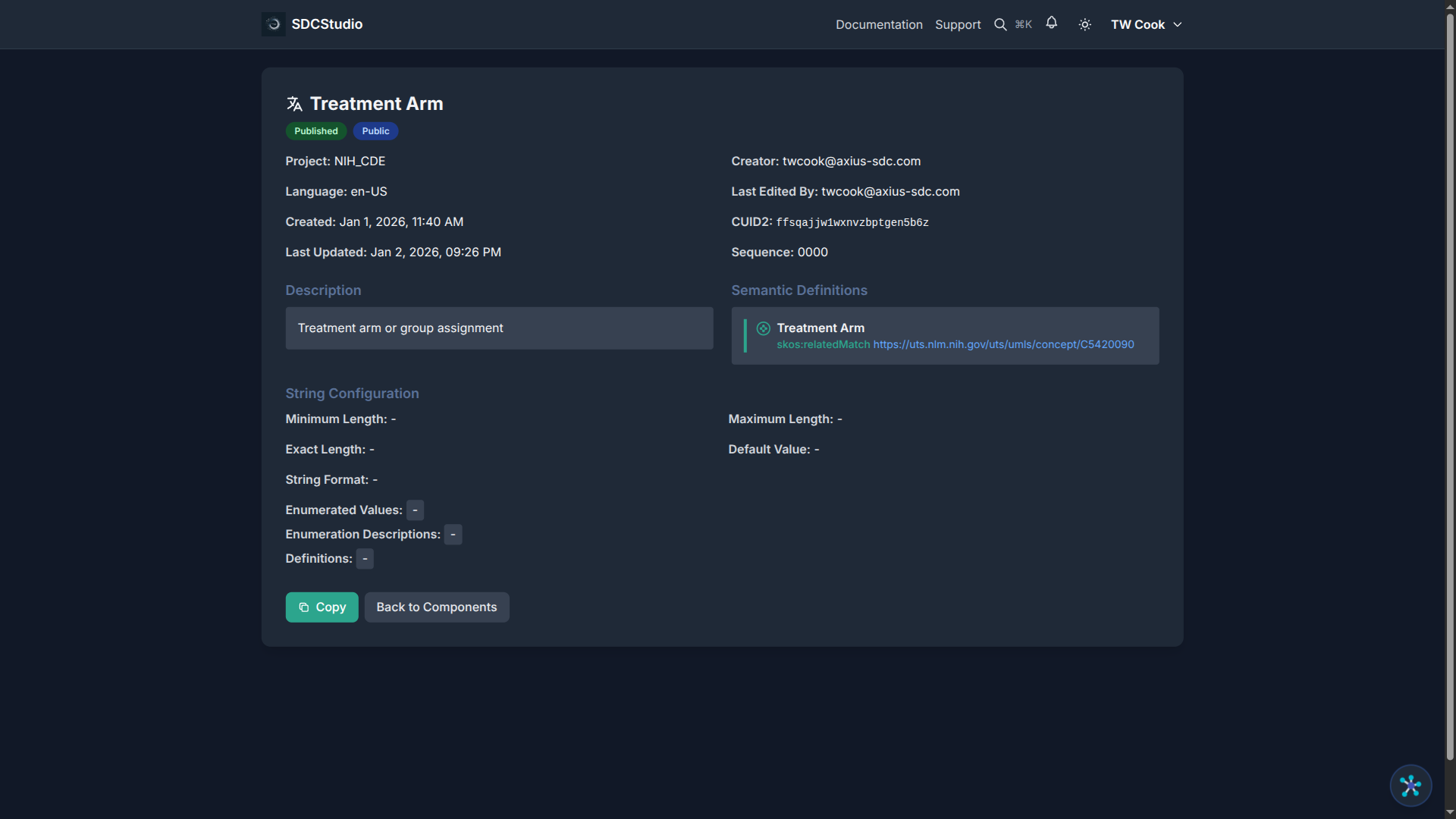
Use for any textual value: names, addresses, emails, codes, descriptions.
Constraints available: min/max length, exact length, regex pattern, enumeration (list of allowed values). See the XML Regex Reference & Sandbox for common patterns and a live tester.
Examples:
- A person's name with max length 100
- An email address with regex validation
- A status field with enumeration ["active", "inactive", "pending"]
XdToken — Normalized Text
Use for machine-readable identifiers where whitespace should be collapsed and trimmed.
When to choose XdToken over XdString: When extra spaces in the data should be automatically normalized (e.g., ISO country codes, product SKUs, API tokens).
XdBoolean — True/False
Use for binary states: yes/no, on/off, enabled/disabled, consent given/not given.
XdCount — Whole Numbers with Units
Use for non-negative integers that represent countable quantities.
Units are required. Even when the unit seems obvious, specify it: "items", "people", "shares", "occurrences".
Examples: 42 items in stock, 100 shares traded, 7 error occurrences.
XdQuantity — Decimal Values with Units
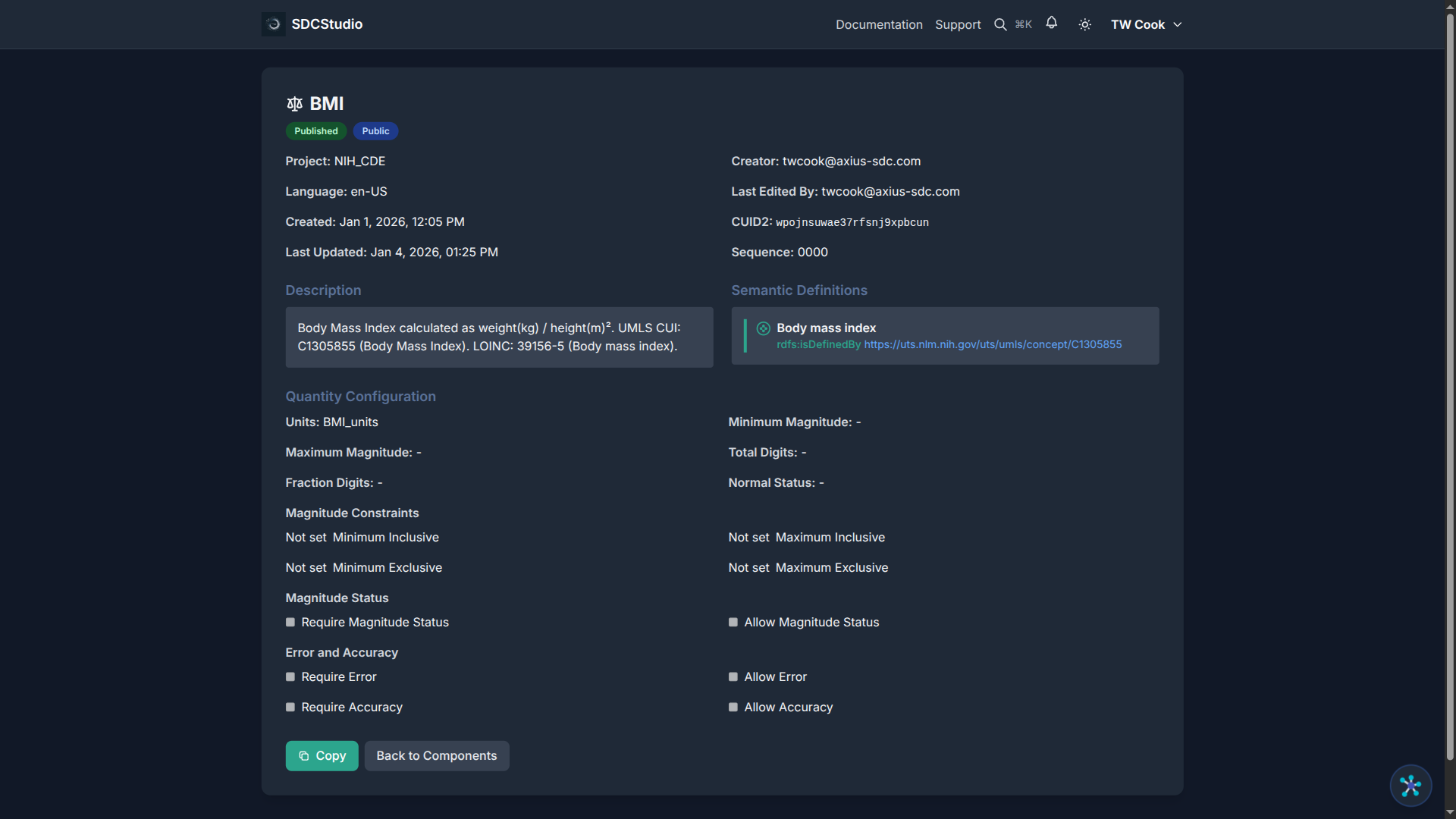
Use for measurements and amounts that need units. This is the most common quantified type.
Units are required: mmHg, kg, USD, km, °C.
Constraints available: min/max value, precision (total digits), scale (decimal places).
Examples: 120.0 mmHg blood pressure, 199.99 USD order total, 37.2 °C body temperature.
XdFloat / XdDouble — Floating-Point Numbers
Use for scientific calculations where IEEE 754 floating-point representation is appropriate.
Prefer XdQuantity for financial data to avoid floating-point rounding issues. Use XdFloat/XdDouble for coordinates, signal processing, or physics calculations.
XdTemporal — Dates and Times
Use for any temporal data. Supports multiple granularities:
- Full datetime: 2025-11-09T15:30:00Z
- Date only: 2025-11-09
- Time only: 15:30:00
- Partial date (year-month): 2025-11
- Year only: 2025
Constraints available: min/max date, granularity, timezone handling.
XdOrdinal — Ordered Categories
Use when categories have a meaningful order: severity levels (mild < moderate < severe), priority rankings, Likert scales.
If categories have no meaningful order (colors, countries), use XdString with an enumeration constraint instead.
XdLink — References
Use for references to other data models, external documents, ontology URIs, or API endpoints. XdLink provides relationship semantics (e.g., "subject_of", "part_of") beyond a simple foreign key.
XdFile — Binary Data
Use for file attachments: images, PDFs, documents. Includes MIME type, file size, and hash-based integrity verification.
ClusterType — Grouping
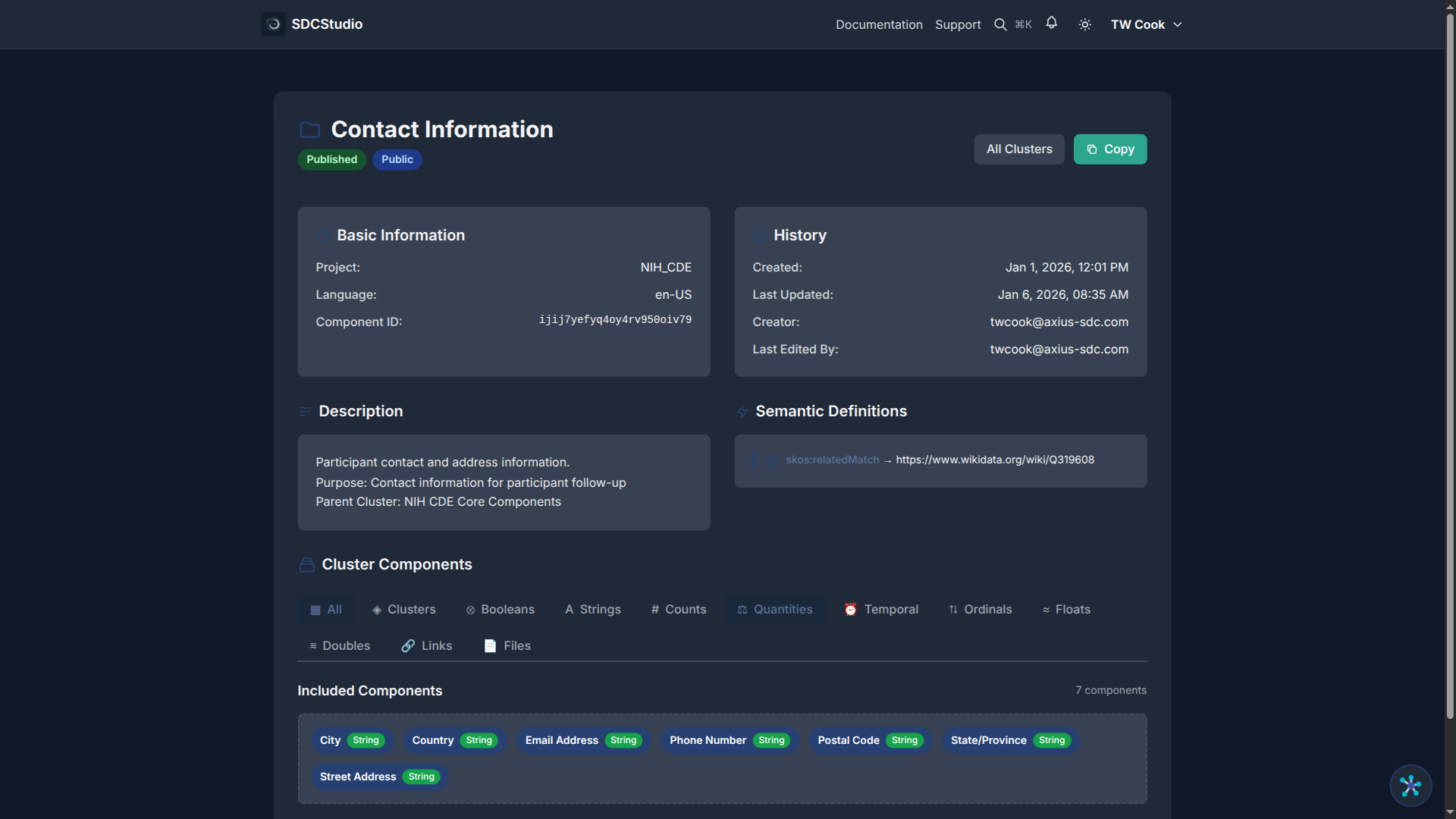
Clusters are not data types in the same sense — they are containers that group related components. See Tutorial 7: Organizing with Clusters.
Reading a Component Detail Page
When you click a component in SDCStudio, the detail page shows:
Header area: - Component label and type badge (e.g., "XdString") - Status badge (Draft or Published) - Edit button (only for unpublished components)
Properties: - Label: Human-readable name - Description: Purpose and usage notes - Project: Which project this component belongs to - Language: The component's language (e.g., en-US)
Type-specific configuration: - For XdString: regex pattern, min/max length, enumerations - For XdCount/XdQuantity: min/max value, units, precision - For XdTemporal: allowed formats, date range - For XdBoolean: default value
Semantic links: - RDF predicate-object pairs linking to ontology concepts
Advanced settings: - Sequence number (display order) - UI type hint - Validation flags (ACT, VTB, VTE, TR, MOD, Location)
Common Type Selection Mistakes
Using XdString for numbers: If the data is numeric and you might do math or comparisons on it, use XdCount or XdQuantity, not XdString. The AI usually gets this right, but check.
Forgetting units on XdCount: XdCount is a quantified type — it requires units. "42" is not enough; "42 items" is correct.
Using XdFloat for currency: Floating-point arithmetic can produce rounding errors (e.g., 0.1 + 0.2 ≠ 0.3). Use XdQuantity with decimal precision for financial amounts.
Using XdString for ordered categories: If the category order matters (low < medium < high), use XdOrdinal so the ordering is captured in the model.
Summary
- Components are the building blocks of SDC4 data models — one per data element
- All types inherit common metadata from XdAnyType (label, definition, temporal validity, access control)
- Quantified types (XdCount, XdQuantity, XdFloat, XdDouble) require units
- Choose the most specific type that fits your data
- The component detail page shows all properties, constraints, and semantic links
Next Tutorial
Creating Components with the Wizard — Learn how to create a new component from scratch using the 6-step Component Wizard.